


Reolink
3.56.48K Reviews
App Specs
- Version
- 4.61.0.3.20260721
- Updated On
- License
- Free
- Downloads
- 5,000,000+
- Developer
- Reolink Innovation Limited
- Categories
- Communication
- Platform
- Android, iOS
Screenshots
 Analysis by AppCompare
I judge a security app less by the novelty of its first setup than by whether I still open it a month later, when checking a camera has become part of ordinary life. Reolink is a communication app from Reolink Innovation Limited for viewing compatible security cameras and recording equipment remotely. It is free, rated for Everyone, and has been around since May 18, 2015. Its current version is 4.60.0.6.20260425, and it works on Android 8.0 and later. Those basics make it easy to try, but the lasting value depends on whether its camera view and alerts fit your home and your habits.
The first week: useful before it feels routine
The initial appeal is practical: once your compatible devices are connected, you can check a live view on your phone rather than walking over to a monitor or waiting until you get home. The app is aimed at Reolink cameras, NVRs and DVRs, so it makes the most sense when you already use that equipment or are choosing a system around it. It is not a general-purpose viewer for every camera brand.
In the first few days, I would focus on making the camera list understandable rather than trying to tune everything at once. Give each view a name that tells you what you are checking, and decide which cameras you actually need at hand. That small bit of organization pays off when you open the app in a hurry: a familiar label is more useful than remembering which thumbnail points toward the driveway or side entrance.
A realistic use is checking the front entrance while you are out, then looking at a recorded moment if you need to understand what happened. That is a different job from watching a live feed continuously. The app can be valuable as an occasional check-in tool, but a phone screen and an alert should not be treated as a substitute for a dedicated security plan or a guaranteed response to an emergency.
Month-to-month value comes from the right checks
Remote viewing becomes more worthwhile when it answers a small, recurring question: did a delivery arrive, is the garage area clear, or should I ask someone at home to check a sound? Those brief visits are where a phone app is more convenient than sitting in front of a recorder. If your cameras rarely capture anything you need to review, however, the app may not earn much attention after the initial setup.
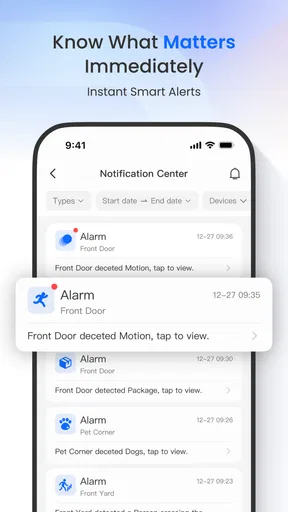
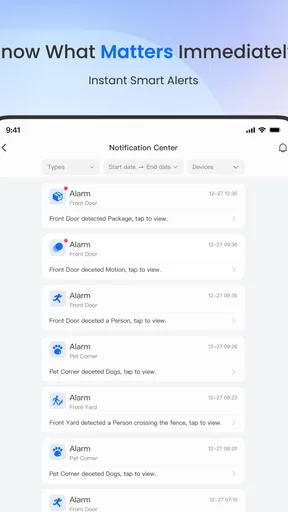
Motion alerts are a place to be deliberate. A sensitivity setting that is too high can turn ordinary movement into noise; one that is too low may miss activity you hoped to notice. I would adjust it around the actual view and then observe what triggers alerts over several normal days before relying on it. Changes in weather, shadows, traffic or a camera’s angle can affect how useful a setting feels, so the best choice is not necessarily the most sensitive one.
That tuning is a trade-off, not a one-time magic fix. If a view faces a busy street, frequent movement may be unavoidable; a camera aimed at a quiet entrance may be easier to monitor. When an alert arrives, opening the relevant camera first can save time, while jumping through every view can make a simple check feel like work. The best routine is the one that gets you to a clear answer quickly without making you watch the app all day.
Worth Reading Before You Choose

EA SPORTS FC Mobile 26 Is a Bigger Football Game, but It Takes Time

Flipboard Shows What News Apps Must Do Beyond the Feed

Switching to Android Auto Means Rethinking Your Driving Routine

Google Calendar Makes a Crowded Week Easier to Manage

Ludo King Makes the Most of the Minutes Between Plans

Baby Panda World Brings Quick Play to Modern Phones, but Its Game Library Feels Busy
Maintenance is mostly about keeping the system usable
The app’s value depends on more than the app itself. Cameras need to remain connected, the phone needs a working network, and saved footage is only useful if you can locate the right camera and time. I would occasionally open each important view, confirm that it loads, and make sure the camera names still match their locations. This is a modest habit, but it is better than discovering a confusing layout during the one moment you need a quick check.
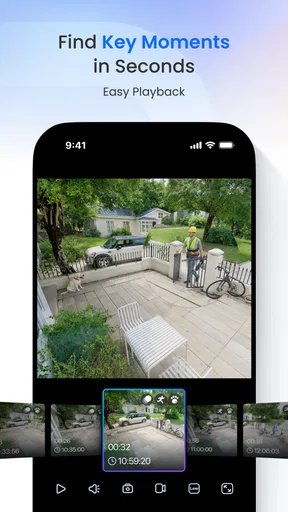
Playback deserves a little practice before it matters. Try finding a known event when you are not under pressure, so you learn how the available recordings are organized on your own setup. If you only ever open live view, you may know that a camera is online but still feel unsure about how to look back at an earlier moment. A short test also helps reveal whether your usual connection makes video loading comfortable or frustrating.
The app is free to install, but that does not make every camera system free to own or maintain. Your experience still depends on having compatible Reolink equipment and a dependable connection. If you are shopping from scratch, consider the cost and practical placement of the camera system as a whole, not just the convenience of the phone app. People who want one universal app for mixed-brand cameras may be better served by choosing a system designed around that requirement.
Reolink has an average rating of 3.5 from around 39,000 ratings, with roughly 6,400 written reviews and over 5 million installs. I take that as a reminder to set realistic expectations rather than as a verdict on every household’s experience. The app has a substantial audience, but the usefulness of remote viewing can vary with the camera setup, home network and how often you need to check footage.
Where convenience can turn into fatigue
Notifications can be the feature that makes an app feel attentive, and the one that makes you stop paying attention. If routine movement keeps prompting a check, it is easy to swipe alerts away automatically. I would rather receive fewer useful notifications than a stream that trains me to ignore them. If adjusting sensitivity does not make a particular view manageable, think about whether that camera angle is suitable for alert-led monitoring at all.
Connection quality is another real limit. A delayed live view or late alert is frustrating when you expect an immediate answer, especially away from home. The app cannot make a weak network behave like a stable one, so it is worth checking how it performs from the places where you actually plan to use it. For urgent situations, I would not rely on a phone notification as the only line of awareness or response.
There is also a difference between being able to view a camera and wanting to keep checking it. Frequent reassurance can become a habit that takes more attention than it returns. I find the strongest case for this kind of app is a quick, intentional check tied to a real need, not leaving a live feed open without purpose. If you do not want to manage alerts or revisit camera settings as your environment changes, a simpler setup with fewer cameras may suit you better.
Getting Started with Reolink
First things first, setting up the app is a breeze. After you download it from the App Store or Google Play, you’ll be prompted to create an account. The interface is clean and intuitive, making it easy even for those who aren’t particularly tech-savvy. Linking your security cameras to the app is straightforward, thanks to the well-guided setup process.
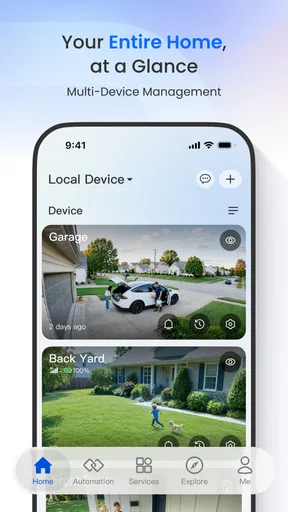
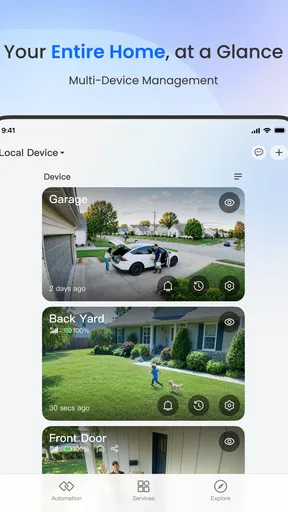
Once you’re up and running, you’ll notice the app’s dashboard is user-friendly. At a glance, you can see all your connected devices, each with a thumbnail preview. This feature is incredibly handy when you want to do a quick check without diving into each camera’s live feed.
Features that Make a Difference
One of the standout features of the Reolink app is its versatility. It supports a range of cameras, from basic models to more sophisticated ones with zoom and pan capabilities. This flexibility means that whether you have a single camera or a full-blown home setup, the app can handle it.
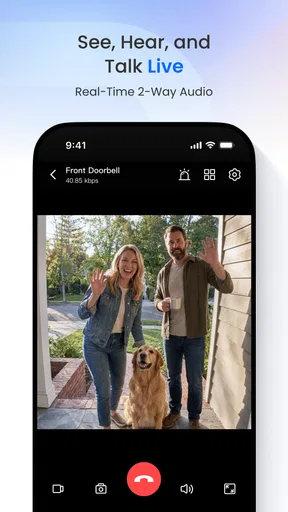
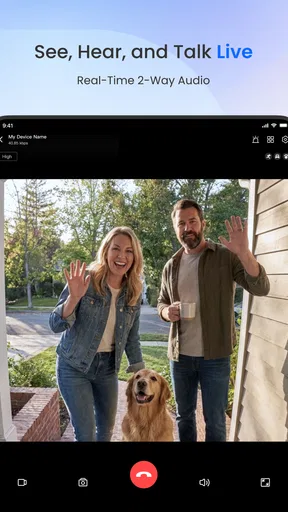
Another impressive feature is the motion detection alerts. These notifications are customizable, allowing you to adjust sensitivity levels to avoid constant alerts from things like a passing car or a pesky squirrel. The app also supports two-way audio, which is perfect if you need to communicate through your camera in real-time.
For those who appreciate a little tech magic, the app’s smart home integration is a big plus. It works seamlessly with Google Assistant and Amazon Alexa, allowing you to control your cameras via voice commands. Imagine sitting on your couch and saying, “Alexa, show me the front door,” and voila, the feed pops up.
Performance and Reliability
In terms of performance, the app delivers a solid experience. The video quality is crisp, and the live feed loads quickly, which is crucial when you need to check in on things in a hurry. The app also offers playback features, so reviewing past footage is straightforward and doesn’t require extensive technical know-how.
However, like any app, it’s not without its hiccups. Some users report occasional lag or delays in receiving alerts, particularly if their internet connection isn’t the strongest. But with a stable network, the app performs admirably, keeping you connected and informed.
When a different approach makes more sense
The most important choice comes before you make this app a daily tool: are your cameras actually in the Reolink ecosystem? If they are, a single place to check live views and recordings is more convenient than switching between separate manufacturer apps. If you have cameras from several brands, a multi-brand platform may be a better fit, provided it supports the devices and functions you need. I would not choose Reolink on the assumption that it will unify unrelated equipment.
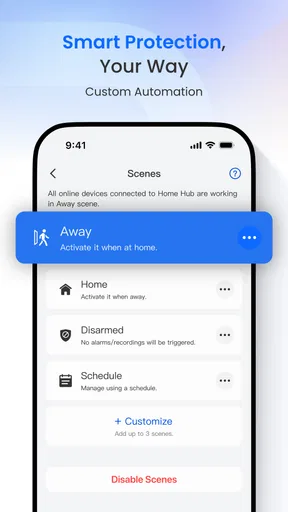
It is also worth separating remote viewing from home automation. Voice control through Google Assistant or Amazon Alexa can make a compatible camera easier to call up, but it does not remove the need to open the app when you want to manage camera views or review footage. For someone who only wants a basic live picture on a phone, the app’s broader camera-management role may be more than they need. For someone who wants to check several Reolink devices in one place, that breadth is the point.
Two-way audio is useful when a brief message is enough, such as speaking to someone near a camera while you are elsewhere. I would treat it as a convenience rather than a replacement for a phone call: the situation, sound quality and connection all affect whether a spoken exchange is practical. Similarly, zoom and pan support matters only with cameras that offer those controls, so it is sensible to check the capabilities of the specific camera rather than assume every view can move or zoom from the app.
If you are deciding whether to keep the app installed, ask yourself what you have actually used it for during an ordinary week. A parent checking a side entrance after a delivery, or someone away from home confirming that a familiar area looks normal, has a clear recurring reason to open it. A person who has no compatible equipment, dislikes phone alerts, or expects the app to monitor a home without any attention from them is less likely to find lasting value. In those cases, another camera ecosystem—or no camera app at all—may be the more sensible choice.
Final Thoughts
Overall, the Reolink app is a robust option for anyone looking to enhance their home security system. Its ease of use, wide range of features, and reliable performance make it a worthwhile addition to your smartphone. While there are minor tweaks that could improve the experience, it’s clear that Reolink is committed to providing a top-notch service.
Whether you’re a seasoned smart home user or just starting to explore the possibilities, the Reolink app is certainly worth checking out. With its combination of functionality and ease of use, it’s a tool that makes managing your home security not only simple but also enjoyable.
My long-term verdict
For me, the strongest reason to give Reolink lasting space on a phone is straightforward: it can turn a compatible set of cameras into something I can check without being at home, and playback gives that check a useful second step when I need context. Its value is recurring rather than spectacular. If the views stay relevant, the alerts remain tolerable and the connection holds up where I use it, the app can settle into a small, dependable routine instead of demanding constant attention.
I would try it if I already owned Reolink cameras or wanted a Reolink-based system and cared about quick remote checks, adjustable motion notifications and reviewing footage. I would be more cautious if I needed one app for multiple camera brands, expected alerts to arrive instantly in every network condition, or did not want to maintain camera names and notification settings. Those are not reasons to dismiss it; they are reasons to match the app to the job.
Reolink is not something I would keep opening just because it is installed. I would keep it because a particular camera answers a question I regularly have. Once you know which views matter, have tested playback, and have adjusted alerts to fit the real scene, the everyday routine can be simple: open the right camera, check what you need, and move on. That practical, repeatable use—not the novelty of a new security setup—is what makes the app worthwhile over time.
Pros
- User-friendly interface for easy navigation.
- High-quality video streaming and recording.
- Supports multiple camera setups.
- Remote access from anywhere via app.
- Motion detection alerts with customization.
Cons
- Limited integration with third-party apps.
- Requires a stable internet connection.
- Subscription needed for full features.
- Occasional lag in live streaming.
- Setup can be complex for beginners.
FAQs for Reolink
What features does the Reolink app offer for security monitoring?
The Reolink app provides a comprehensive suite of features for security monitoring, including real-time video streaming, motion detection alerts, and remote access to your cameras from anywhere. Users can also schedule recordings, view playback, and customize settings for each camera. The app supports both Wi-Fi and cellular networks, ensuring constant connectivity.
Is the Reolink app compatible with my existing security cameras?
The Reolink app is compatible with Reolink's own range of security cameras, including both wired and wireless models. If you have existing cameras from other brands, compatibility may vary, and it's recommended to check the Reolink website or consult customer support for specific compatibility information before downloading the app.
How user-friendly is the Reolink app for beginners?
The Reolink app is designed with user-friendliness in mind, featuring an intuitive interface that is easy for beginners to navigate. The setup process is straightforward, with step-by-step guides to help users connect their cameras and configure settings. Additionally, the app provides helpful tutorials and customer support for any troubleshooting needs.
Are there any subscription fees or in-app purchases in the Reolink app?
The Reolink app itself is free to download and use, with no mandatory subscription fees. However, some advanced features, such as cloud storage, require a subscription plan. Users can choose from various pricing tiers based on their storage needs, but all basic functionality remains accessible without additional costs.
What kind of customer support does Reolink offer for app users?
Reolink provides robust customer support for app users through multiple channels including email, live chat, and a comprehensive support center on their website. The support center offers FAQs, troubleshooting guides, and video tutorials. Users can also access community forums to share experiences and solutions with other Reolink users.


